
Every console operation is available
in PowerShell.
AUTOMATION
Automate Group Policy management from the command line. The web console is one interface; the other is a PowerShell snap-in covering the same operations — authoring, workflow, comparison, delegation and reporting — shipping with the product today.
IN THE SNAP-IN189
cmdlets, covering the lifecycle, delegation, reporting and the directory side.READ OPERATIONS71
Get- cmdlets, so the Repository can be queried without modifying it.AVAILABILITYToday
Shipping with the product. No feature on this page is in preview.Three lines to a connected session
GETTING STARTED
The snap-in authenticates the same way as the console, using an existing credential. There is no API key to provision and no service principal required.
Add-PSSnapin UPA.Management$cred = Get-Credential
$cred | Get-HAPIConnection -HAPIServerUrl 'https://upa.corp.example.com'The Repository is then an object model rather than a screen to be scraped. Every policy, version, event, role and comparison is a PowerShell object that can be filtered, sorted, grouped and exported.
A nightly check for Group Policy changed outside the process
A WORKING EXAMPLE
This is usually the first script written, because it answers a specific question: has a GPO been edited directly in Active Directory? It compares every managed policy against the live object and reports those that no longer match.
$drift = foreach ($up in Get-UniversalPolicy) {
$diff = $null
try { $diff = Get-DiffReport -UPId $up.GlobalPolicyId -VersusGPOInAD -ErrorAction Stop } catch { }

$areas = @()
if ($diff -and $diff.Changes) { $areas = @($diff.Changes.Keys) }

[pscustomobject]@{
Policy = $up.Name
Version = $up.Version
Drifted = [bool]$areas.Count
Areas = ($areas -join '; ')
}
}
$drift | Where-Object Drifted | Export-Csv .\gpo-drift.csv -NoTypeInformation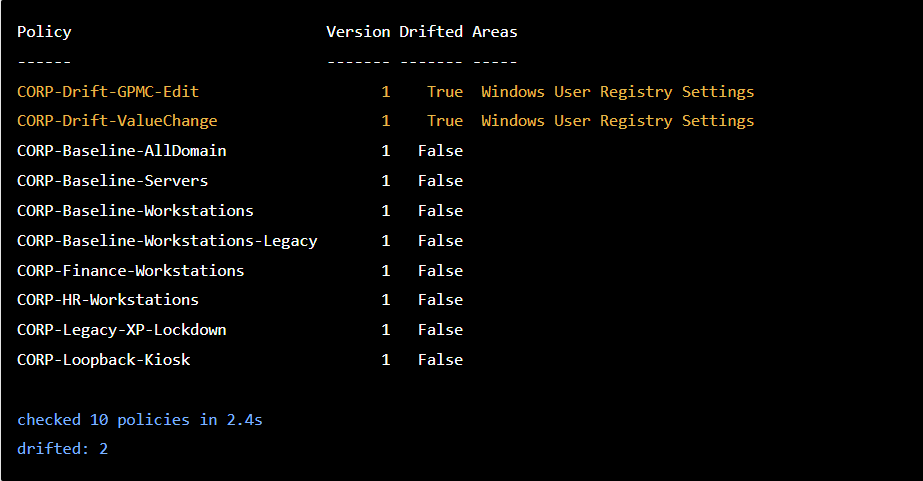
Run against a set of policies, it returns this:
Real output from a test environment: two policies deliberately edited outside the process, both found, the other eight confirmed clean.THE SCRIPT, THEN THE CONSOLE 0:37 · NO SOUND
The scheduled run finds two policies changed outside the process. One is opened in the console and compared against the live GPO in Active Directory, showing the setting that was enabled directly in AD.Run on a scheduled task, drift is reported the following morning rather than discovered at audit. The script is roughly fifteen lines, which is the point of exposing the comparison engine rather than confining it to a report screen.
If it is in the console, it is in the snap-in.
Authoring, check-out, approval, deployment, delegation, comparison and audit — the console and the command line address the same operations.
What the snap-in exposes
THE SURFACE
The distribution by verb is below. The naming follows standard PowerShell conventions, so most of the surface is predictable once part of it is familiar.
Rollback- 1Get- 71Test- 3Set- 19Find- 2Update- 12Add- 16New- 15Remove- 26WHAT IT IS FOR
CMDLETS
AREA
New- Import- Checkout- Checkin- Submit- Approve-
Deploy-UniversalPolicy-Lifecycle
The full controlled change process, scriptable end to end — including the approval step.
Recovery
Rollback-UniversalPolicy
Revert-UniversalPolicy
Return a policy to an earlier version, or release a checkout somebody left open.
Get-UniversalPolicy Get-DiffReport
Get-AuditEventReporting
Inventory, comparison and the change record — the three things every custom report is built from.
Search
Find-UniversalPolicy-
Find-UniversalPolicySettings-Find which policies carry a given setting, across the Repository, without exporting anything first.
Get-Roles Get-RolesForUser Add-Role Get-ViewScopes
Get-DelegationAssignmentsDelegation
Build and audit the permission model in code, rather than clicking it together and hoping it matches the document.
Clone- Assign-
Link-UniversalPolicyDistribution
Copy a policy, put it in a domain, and link it where it belongs.
COMPANION SCRIPTS
Fourteen scripts, already written
A companion set of fourteen scripts is available to customers from the support portal, covering reporting, searching, auditing and unattended alerting. Each carries full Get-Help documentation with worked examples. Ten are read-only; the four that write support -WhatIf or a dry run.
ALERTINGTell me when a policy drifts
Send-UPA-Out-of-Sync-Alert.ps1 emails an administrator when a policy falls out of step with its GPO in Active Directory. Built to run as a scheduled task.ALERTINGTell me about GPOs we do not manage
Send-Unmanaged-GPO-Alert.ps1 emails when a GPO appears in Active Directory that UPA does not manage.REPORTINGSettings into a spreadsheet
Export-UPA-SettingsReport.ps1 exports a policy's settings to CSV and HTML, so they can be filtered, compared and retained. The console offers print and PDF.REPORTINGSix kinds of comparison
Export-UPA-DiffReport.ps1 compares two versions, two policies, a policy against its live GPO, against its last approved version, or pending edits against what is checked in.AUDITThe history one auditor asked for
Export-UPA-PolicyHistory.ps1 reports who created, edited, submitted, approved and exported each version of a policy, with the comments and the settings that changed between them.AUDITThe whole trail, resolved
Export-UPA-AuditEvents.ps1 exports every check-in, approval and deployment across the Repository to CSV, with account identifiers resolved to display names.INVESTIGATIONWhich policies set this, and to what
Find-UPA-Setting.ps1 finds every policy configuring a given setting, the value each one uses, and where two of them contradict each other. The consolidation tool.OPERATIONSWhat is waiting on someone
UPs-Waiting-for-Approval.ps1 lists every policy submitted but not yet approved — a daily check, or the one you run before a change window.GOVERNANCEBack up the permission model
Export-UPA-Administration.ps1 writes roles, views and assignments to CSV; its companion import recreates them on another instance or after a rebuild.The rest cover the jobs you need once rather than often: importing a domain's OU and GPO topology, renaming a policy and its backing GPO together, freeing a checkout left open by someone unavailable, and timing the health endpoints when the console feels slow. All fourteen come from the support portal as one bundle.
Group Policy automation, answered
COMMON QUESTIONS
-
Yes — a snap-in, UPA.Management, containing 189 cmdlets covering the policy lifecycle, comparison, audit, delegation and reporting. It ships with the product and is available to customers today.
-
They are available to customers from the support portal. The bundle is self-contained — copy the folder anywhere and run the script you need. Nothing is installed, and nothing in it changes UPA unless the script’s name says it does.
-
The whole workflow. Check-out, check-in, submit for approval, approve and deploy are all exposed, so an automated change goes through the same controlled process as one made in the console and produces the same audit record.
-
Yes. Get-DiffReport -VersusGPOInAD compares a managed policy against the live Group Policy Object in Active Directory. Run it across the Repository on a schedule and out-of-band changes are reported rather than discovered.
-
No. The snap-in connects to the UPA server directly with a credential, so scripts run from a scheduled task, a build agent or an administrator’s session without anyone signed in to the web console.
-
Both, and the distinction is enforced by the same permission model as the console. 71 of the cmdlets are Get- operations, so an account can be given the ability to report on the Repository without the ability to alter it.
Ready to elevate your policy control?
NEXT STEP
READY TO ELEVATE YOUR POLICY CONTROL?
Modernize Your Group Policy Management Today
Join leading enterprises in revolutionizing their policy management. Book a personalized demo to see how UPA can future-proof your operations.
Web Console
100% GPO support in a modernized web console
Comprehensive Change Management
Offline changes, workflows, policy analysis, auditing
Enterprise Ready
Delegated administration, every domain, no agent